Menu builder
From RCampus Wiki
(Redirected from Side menu)
The top and side menu builders help you design the menus of your website and ePortfolios.
Contents
The top menu builder allows you to easily hide or show top menu items of a website or ePortfolio.
- Click on the edit menus (
 ) button located next to the menus.
 - Select Top Menu.
- Check the box for the top menu items of your liking.
- Press save.
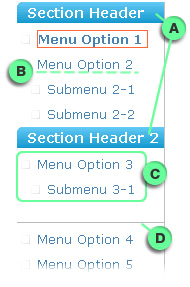
The side menu builder allows you to easily build the side menu, add/remove menus, change menu labels, change the menu order, add menu headers and separators, etc.
- Click on the edit menus () button located next to the menus.
- Select Side Menu.
- Make changes and press save all changes.
- See Tutorial below for details.
Tutorial
See tutorial at Side Menu Help